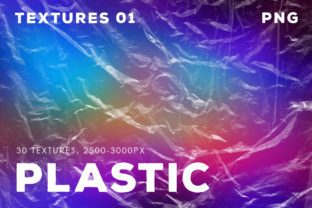
Isolated Plastic Textures 1: 30 High-Res Overlays
Every creative project eventually hits a wall where flat colors and standard gradients just aren't enough. You are looking for that tactile element, something that implies depth and physical presence without cluttering the design. This is exactly where Isolated Plastic Textures 1 enters the workflow. It is not just a random collection of backgrounds; it is a curated set of 30 distinct visual assets designed to mimic the light refraction and glossy depth of plastic materials. For designers, marketers, and content creators, these overlays offer a quick way to inject a modern, industrial, or playful aesthetic into digital and print assets.
Visual Character and Personality
At its core, Isolated Plastic Textures 1 offers a specific visual language. These are high-resolution files, clocking in at a massive 3000x3000 pixels, ensuring that you can scale them for large format printing or high-DPI screens without losing fidelity. The "isolated" aspect is crucial here. Unlike standard stock photos where the texture is baked into a scene, these are clean, standalone overlays. You will find varying degrees of translucency, light refraction, and color shifts within the 30 different files.
The personality of these textures is inherently contemporary. They speak to a "new media" aesthetic—think of the glossy sheen on a modern UI element, the packaging of high-end consumer electronics, or the vibrant backgrounds of a podcast cover. The visual style balances between synthetic precision and organic light behavior. They can feel futuristic and cold, or warm and playful, depending entirely on the color palette you apply beneath them. For a brand strategist, using Isolated Plastic Textures 1 signals that a brand is current, tech-savvy, and attentive to detail.
Practical Applications Across Industries
The versatility of this asset pack is one of its strongest selling points. Because the files are provided in both JPEG and PNG formats, they integrate seamlessly into almost any software environment, from Adobe Photoshop to Canva, Procreate, or Affinity Photo.
Branding and Logo Design
In logo design, texture is often used to add dimension to a flat mark. If you are working on a brand identity for a tech startup, a music festival, or a modern retail brand, applying these plastic overlays can transform a simple shape into a 3D element. This works exceptionally well for hero images on websites or "About Us" sections where you want to establish a premium look. It moves a brand away from generic flat design into something more tactile and engaging.
Marketing and Social Media
For marketers and social media managers, stopping the scroll is the primary goal. Isolated Plastic Textures 1 serves as an excellent background layer for text-heavy graphics. When you place bold typography over a distorted plastic overlay, the text pops because of the contrast between the sharp letters and the soft, refractive background. This is particularly effective for Instagram Stories, YouTube thumbnails, and banner ads where visual hierarchy is essential. The texture adds enough visual noise to make the design interesting but not so much that it compromises readability.
Publishing and Editorial Design
In editorial design, such as magazine covers or book jackets, these textures can simulate physical materials. Imagine a cover design for a sci-fi novel or a futuristic cookbook. The plastic overlays can be manipulated to look like cellophane wrapping or rigid acrylic, adding a layer of conceptual depth to the publication. It is a premium font-agnostic asset; it works just as well behind a serif font for a high-fashion spread as it does behind a sans serif font for a tech manual.
Technical Workflow: Maximizing the Overlays
Simply dragging and dropping an image file is rarely the final step in professional design. To get the most out of Isolated Plastic Textures 1, you need to treat them as raw materials rather than finished products. Here is how to manipulate them effectively within your workflow.
Layering for Intensity
One of the most effective techniques is duplication. If a single layer of the texture feels too subtle, simply duplicate the layer. You can stack two, three, or even four instances of the same texture to increase the density of the effect. However, do not stop there. Change the blending modes of the top layers. Try using "Overlay" or "Soft Light" to blend the texture with the underlying color, or "Screen" to brighten the highlights. This allows you to dial in the exact level of intensity required for the project.
Combining Effects
The 30 different overlays included in the pack are designed to be mixed. You might take a subtle ripple from one file and combine it with a high-contrast refraction from another. By lowering the opacity of the top layer, you can create complex, unique surfaces that no one else will have. This is particularly useful for creating a consistent brand identity where you need a "family" of textures that look related but not identical.
Sharpening and Blurring
The instructions to use Filter – Sharpen – Unsharp Mask are vital for print work. When textures are scaled or printed, they can lose some of their crispness. Applying a subtle unsharp mask ensures that the edges of the light refractions remain crisp, maintaining that high-resolution premium feel. Conversely, if you are using the texture as a background element that shouldn't compete with the foreground, use Filter – Blur. A Gaussian blur or a Motion blur can turn a sharp texture into a smooth, ethereal gradient. This is excellent for adding motion to a static social media graphic or softening the background behind a lengthy block of text to ensure legibility.
Evaluating Fit and Workflow Integration
When deciding if Isolated Plastic Textures 1 is the right asset for your current project, consider the emotional tone. Does the project require a sense of modernity, gloss, or futurism? If you are designing for a vintage bakery or a rustic farmhouse, these textures might feel out of place. But for anything related to technology, music, urban lifestyle, or modern commerce, they are a perfect fit.
Font pairing is also a consideration. Because these textures are visually complex, they generally pair best with clean, geometric typefaces. A bold sans serif font allows the texture to breathe, whereas a highly decorative script font might get lost in the visual noise of the plastic. Use the texture to support your typography, not fight it.
Ultimately, Isolated Plastic Textures 1 is about adding value to your creative toolkit. It saves time that would otherwise be spent trying to photograph or render these effects from scratch. By understanding how to layer, sharpen, and blur these assets, you can elevate a standard project into something that feels polished, professional, and visually distinct.