Instant Dimension: Using 100 Spotlight Overlays for Dramatic Design
There is a specific moment in graphic design where a project feels complete, but it lacks that final, professional "pop." You have your typography sorted, your color palette locked in, and your composition balanced, yet the image feels flat against the screen. This is where lighting becomes your most powerful tool. Introducing the 100 Spotlight Overlays collection—a set of high-resolution design assets engineered to add immediate depth, drama, and focus to your creative work. These are not just filters; they are tools for visual storytelling, designed to guide your viewer’s eye exactly where you want it.
The Anatomy of Light: What Makes These Overlays Unique
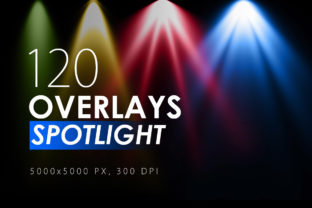
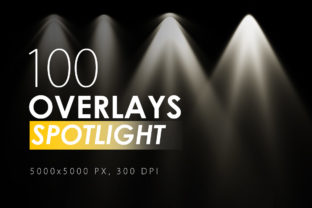
Understanding the technical quality of your assets is just as important as understanding their aesthetic. The 100 Spotlight Overlays package is built on a foundation of massive resolution—5000x5000 pixels. In the world of web design and print design, resolution dictates versatility. Because these files are so large, they maintain their clarity and grain structure whether you are working on a small Instagram post or a large-scale banner for packaging design.
The collection offers 100 different light variations. This variety is crucial for maintaining a fresh portfolio. You might find that a soft, warm glow works best for a lifestyle brand’s social media feed, while a harsh, high-contrast beam is necessary for a music festival poster or a dramatic logo design presentation. The visual personality of these overlays is distinct—they simulate natural and artificial lighting sources, creating realistic shadows and highlights that blend seamlessly with your existing photography or digital art.
Strategic Application: Enhancing Visual Hierarchy
Lighting is not merely decorative; it is functional. In modern typography and layout, we use contrast to establish hierarchy. Spotlight overlays allow you to manipulate that contrast physically. By darkening the edges of a frame and brightening the center, you naturally force the viewer's attention toward the subject.
For entrepreneurs and small business owners, this technique is invaluable for social media graphics. When you are competing for attention in a crowded feed, a subtle spotlight effect can make the difference between a scroll-past and a click. It adds a layer of professionalism that suggests high production value, which in turn builds trust with your audience. Whether you are creating a hero image for a website or a thumbnail for a blog post, the ability to control light direction helps you dictate the narrative of the image.
Practical Workflow: How to Use Spotlight Overlays
One of the greatest strengths of the 100 Spotlight Overlays is their simplicity. You do not need to be a 3D rendering expert to achieve professional lighting effects. The process relies on fundamental image editing techniques available in almost any software, from Adobe Photoshop to Affinity Photo and even some advanced mobile editors.
Here is the step-by-step process for integrating these assets into your workflow:
- Layering: Import your base image. Then, place the spotlight overlay .jpeg file on a new layer directly above your image.
- Blending Modes: This is the most critical step. Change the layer blending mode of the overlay to "Screen." The Screen mode ignores the black pixels in the overlay and only displays the light information, effectively "projecting" the light onto your photo.
- Opacity Control: Lower the opacity of the overlay layer to taste. Sometimes a 100% effect is too strong; a 50% effect might look more natural.
Once you have the basics down, you can begin to experiment with advanced techniques to refine the visual hierarchy of your project:
- Intensifying Effects: If a single overlay isn't providing enough punch, duplicate the layer. Stacking overlays can create a richer, more complex lighting environment.
- Combining Assets: Don't be afraid to mix different overlays from the pack. You might use a broad wash of light for the background and a tighter spotlight for the foreground subject.
- Sharpening: To ensure the light beams look crisp, especially in high-resolution editorial design, use your software’s Filter – Sharpen – Unsharp Mask. This brings out the texture within the light.
- Motion and Blur: For a more dynamic, cinematic look, apply Filter – Blur. A Gaussian blur can soften the light for a dreamy effect, while a Motion blur can add a sense of speed and energy, perfect for sports or automotive content.
Integrating Light with Typography and Brand Identity
When designing a brand identity, consistency is key. The way you treat light in your imagery should align with your brand’s voice. A luxury brand might use these overlays to create a soft, glowing ambiance around products, reinforcing a sense of exclusivity. Conversely, a tech startup might use sharper, more defined spotlight effects to convey precision and innovation.
These overlays also interact beautifully with text. If you are working on a poster that features a bold display font or a flowing script font, placing a spotlight behind the text can help separate it from the background image. This technique ensures that your typography remains readable, regardless of the complexity of the underlying photo. It is a common technique in packaging design to ensure legibility on store shelves where lighting conditions vary.
Versatility Across Creative Industries
The utility of the 100 Spotlight Overlays extends far beyond simple photo editing. For crafters and hobbyists, these overlays can transform a standard digital scrapbook page into a rich, textured memory. For marketers, they are essential for creating seasonal campaigns—think of the dramatic lighting needed for Halloween promotions or the warm, glowing effects required for holiday sales.
Even in web design, where flat design has been popular, there is a resurgence of depth and layering. Using these overlays on background images can add a subtle texture that prevents a website from feeling sterile. It creates a visual atmosphere that makes users want to stay on the page longer.
Ultimately, the 100 Spotlight Overlays are more than just a collection of JPEG files; they are a toolkit for emotional resonance. By mastering how to use them, you gain the ability to manipulate mood, direct focus, and elevate the perceived quality of any project you undertake. Whether you are a seasoned designer or a small business owner handling your own marketing, these assets provide a direct path to more compelling visual communication.