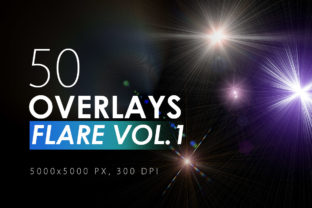
50 Flare & Stars Overlays: Adding Instant Atmosphere
Sometimes a photograph is technically perfect—sharp focus, correct exposure, solid composition—but it still feels like it’s missing a spark. That extra layer of magic, the kind you see in high-end editorial spreads or cinematic posters, often comes from carefully applied texture and light effects. If you’ve been looking for a way to add that professional polish without spending hours in Photoshop, the 50 Flare & Stars Overlays Volume 1 is a set of design assets built specifically for that purpose. It’s not just a collection of filters; it’s a toolkit for transforming mood and directing the viewer’s eye.
Understanding the Kit: What’s Inside
At its core, this is a pack of 50 distinct, high-resolution PNG overlays. Each file is a massive 5000x5000 pixels, which means they are suitable for everything from social media graphics to large-format print projects without any loss of quality. The collection features a variety of light effects: horizontal and diagonal lens flares, subtle star bursts, anamorphic streaks, and soft, diffused glows. The personality of these overlays leans toward the dramatic and cinematic, but with enough subtlety to be used in professional branding and marketing materials.
The style is versatile. You’ll find effects that mimic the warm, golden hour light of a sunset, cool blue sci-fi glows, and clean white flares that add energy to a scene. Because they are overlays—meaning they are designed to be layered on top of your existing work using blend modes like Screen or Lighten—they integrate seamlessly into a wide range of projects. Think of them as a premium font for your images; they set a tone and establish a visual hierarchy that plain text or a basic photo edit can’t achieve alone.
Practical Applications Across Creative Fields
The real value of a resource like this is in its application. For social media graphics, a well-placed flare can stop the scroll. It adds a level of polish that makes a post look designed, not just assembled. A blogger might use a subtle star overlay to make a product photo feel more luxurious, while a marketer could use a bold lens flare to draw attention to a headline in a promotional image.
In packaging design or logo design, these overlays can be used to create textured backgrounds or to add a metallic sheen to lettering. For editorial design—think magazine layouts or book covers—they can establish a mood instantly. A mystery novel cover might use a sharp, diagonal flare to create tension, while a wellness blog could use soft, warm glows to evoke calm. Even in web design, they can be used as background elements to add depth to a hero section or to frame a call-to-action button.
The key is that these are creative font equivalents for visual effects. Just as you’d choose a serif font for tradition or a sans serif font for modernity, you choose a flare style to convey energy, romance, drama, or sophistication. They influence brand perception by adding a consistent layer of professional-grade visual texture.
Getting the Most Out of Your Overlays
Simply dragging and dropping an overlay isn’t always enough. To make the effect truly your own and ensure it integrates with your project’s visual hierarchy, a few advanced techniques are worth mastering.
First, duplicate your overlay layers. Applying the same flare twice on separate layers with reduced opacity can make the effect more intense and vibrant without becoming overpowering. This is especially useful for creating a standout social media graphic where you need the effect to be visible even on small screens.
Second, combine different effects. Don’t be afraid to layer a horizontal flare with a subtle starburst. Use layer masks to control where each effect appears, ensuring they work together to guide the eye rather than compete for attention. This is how you create a unique look that feels custom-designed for your brand identity.
Third, use Photoshop’s filters to refine the overlays. The instruction to use Filter – Sharpen – Unsharp Mask is particularly useful. A slight sharpening can bring out the crisp details in a star overlay, making it look more defined and intentional. Conversely, applying a Filter – Blur (like a Gaussian or Motion Blur) can soften a flare, giving it a more dreamlike, motion-filled quality. This is a fantastic trick for adding a sense of movement to a static image or for creating a more ethereal mood for a design asset.
Integrating Effects into Your Workflow
Think of these overlays as you would any other design asset in your toolkit. Before applying them, consider your project’s existing color palette and lighting. A cool blue flare might clash with a warm, autumnal photo, while a golden flare could enhance it beautifully. Test different overlays on a duplicate layer to see which one complements—not overwhelms—your base image.
For commercial font and asset use, it’s always wise to review the licensing. This pack is designed for both personal and commercial projects, which is ideal for entrepreneurs and small business owners creating their own marketing materials. However, always double-check the terms for any specific client work or large-scale distribution.
Ultimately, the goal is to use these effects with intention. They are not a fix for a poorly composed photo, but rather a tool to elevate a good image into a great one. Whether you’re designing a web design header, a printed flyer, or an Instagram story, the right flare can add that final touch of professionalism and creative flair that makes your work memorable. It’s about enhancing the story your image is already telling, using light as your narrative tool.